PDF to Image Converter Pro2.21
Publisher Description
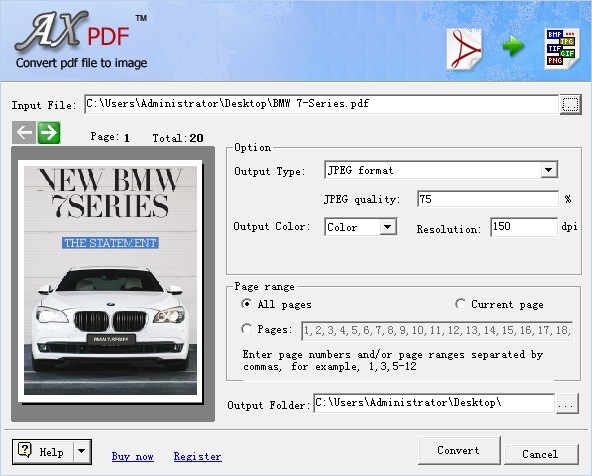
AXPDF PDF to image converter Pro is easy-to-use for batch converting PDF to images including batch convert PDF to JPEG, and support more than other 7 image formats including pdf to TIFF, pdf to PS, pdf to PNG, pdf to BMP, pdf to PCX, pdf to GIF and pdf to EPS. AXPDF is an efficient application which lets you best handle the output of your converted images. There is no need to install any PDF readers on your machine, it is a stand alone converter.
What is your best choice to convert PDF to JPEG and other formats of images? That is AXPDF PDF to image converter Pro. Can't wait to see your PDF documents in images? Just try it with AXPDF!
--------------------------------------------------------------------
Key Features:
1. Convert PDF into images, including JPEG, TIFF, PS, PNG, BMP, PCX and EPS.
2. Batch processing (Pro version only).
3. Full-page conversion.
4. Multipage conversion.
5. PDF preview before conversion.
6.Variable output color depth.
7. Variable image quality with resolution (DPI).
8. Variable tiff file compressions: default, none, RLE, Fax, Pack Bits, Jpeg, LZW.
9. Five optional PostScript levels settings for PS and EPS.
10. Standalone program: does not require Adobe Acrobat, or Acrobat Reader.
About PDF to Image Converter Pro
This Converters & Optimizers program is available in English. It was last updated on 29 September, 2026. PDF to Image Converter Pro is compatible with the following operating systems: Windows.
The company that develops PDF to Image Converter Pro is AXPDF. The latest version released by its developer is 2.21. This version was rated by 1 users of our site and has an average rating of 4.0.
The download we have available for PDF to Image Converter Pro has a file size of 3.1 MB. Just click the green Download button above to start the downloading process. The program is listed on our website since 2011-01-13 and was downloaded 245 times. We have already checked if the download link is safe, however for your own protection we recommend that you scan the downloaded software with your antivirus. Your antivirus may detect the PDF to Image Converter Pro as malware if the download link is broken.
How to install PDF to Image Converter Pro on your Windows device:
- Click on the Download button on our website. This will start the download from the website of the developer.
- Once the PDF to Image Converter Pro is downloaded click on it to start the setup process (assuming you are on a desktop computer).
- When the installation is finished you should be able to see and run the program.
